

Alright fixed the green wire (clock), tried a couple of batteries now and didnt get no output that that was probably cause of bad wiring from my part, now i tried the acer battery,the one i sent the pics of and u told me its bad to test cause of the chip, that one works and shows data on start reading, so i think its fixed for now
Great.
Could you please post a screenshot form this battery AS10D51 with dynamic data & static data with chip detection by SMBus enabled?

Ok i got 1 more question how do i get 10 days trial for laptop chip reset?
@torture here you go,just lemme know on my 10 days trial how do i get it, i wanna try it out,i want to unlock couple of my batteries and see how it works,if its actually working and after unlocking i could charge batteries than that would be dope and i would buy it for sure
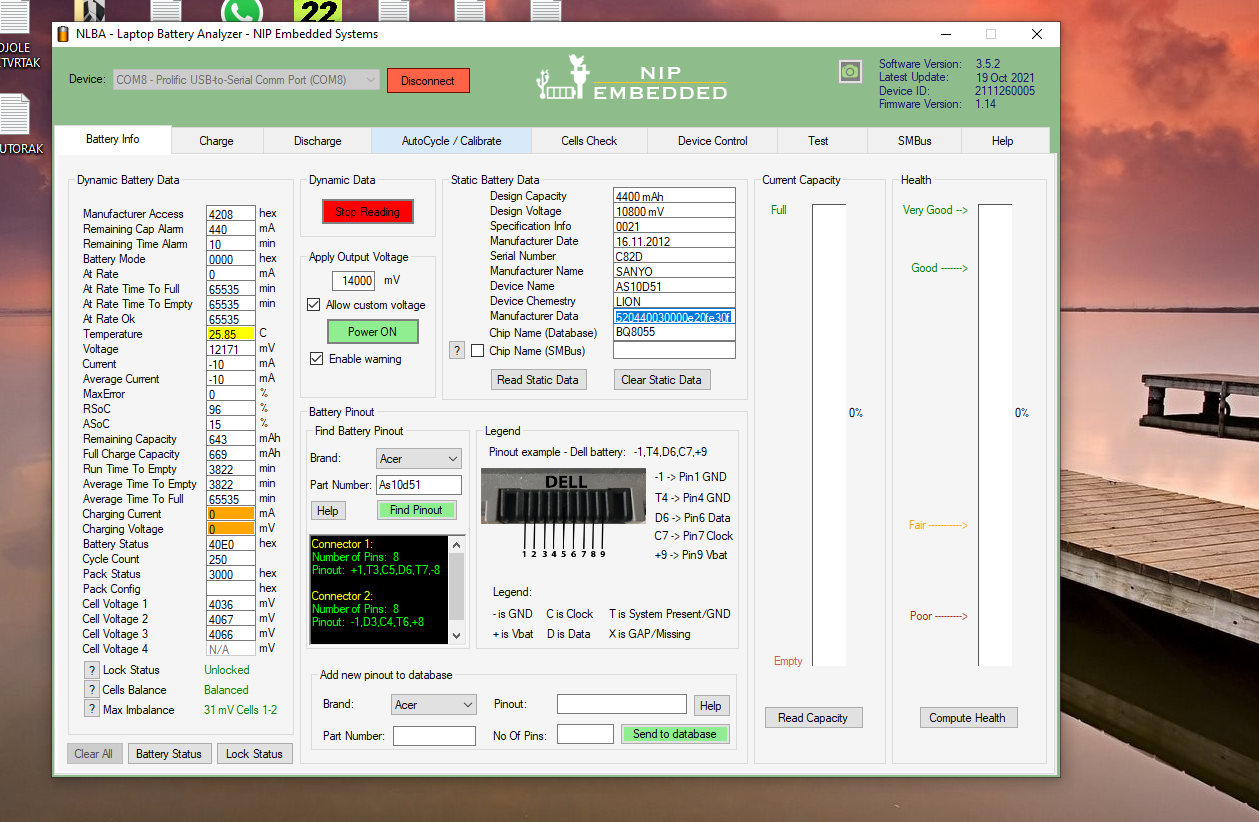
Ok so it's not MAXIM chip.
I'm glad you figured out the problem. Please mark the topic as solved.
@torture I will,can u help me out with my trial,i rly want to try it out for 10 days, how can i reedem it, if its good ill buy it for sure
Only @azzido (Nicosur) can activate your trial license.
You can contact him via Whatsapp from the contact form.
@torture i got a quick question,i have a locked mu06 battery,i managed to unlock it with the trial u gave me but battery is bad balance since 3rd cell is at lower mV than it should be,first two are at 3000+ but the third is at around 2600 mV and is orange when im reading it. Now my question is: is there a way for me to somehow get that battery cell to 3000+,like the first two, so i could have good balance? Will the option "Apply output voltage" set at for example 11000 mV help me maybe or should i try just in the charge tab to try to charge it at 3000mV? I know opening the battery and changing the cell might help but i aint doin that. Thanks in advance!
@torture Also another question,will just leaving the battery on "Apply output voltage" with 3000mV be the same as charging battery in charging tab? Cause when i try to charge some batteries in charging tab, it says bad communication, but i can read the battery when i use apply output voltage,cells are fine,just wont charge at charge tab
@torture i got a quick question,i have a locked mu06 battery,i managed to unlock it with the trial u gave me but battery is bad balance since 3rd cell is at lower mV than it should be,first two are at 3000+ but the third is at around 2600 mV and is orange when im reading it. Now my question is: is there a way for me to somehow get that battery cell to 3000+,like the first two, so i could have good balance? Will the option "Apply output voltage" set at for example 11000 mV help me maybe or should i try just in the charge tab to try to charge it at 3000mV? I know opening the battery and changing the cell might help but i aint doin that. Thanks in advance!
Charge the battery to 30% and check cells voltages again.
"Apply output voltage" with 3000mV be the same as charging battery in charging tab?
No it's not the same, and with 3000mv you can't charge any battery. Charge tab follows exactly the battery voltage and current requests from the chip. With apply output voltage if you are not carefull you can trigger overvoltage or overcurrent safety status and lock the chip, burn the fuse etc.
Cause when i try to charge some batteries in charging tab, it says bad communication, but i can read the battery when i use apply output voltage,cells are fine,just wont charge at charge tab
Each battery must be analyzed seperately. Open a dedicated topic for it and we see whats wrong.
Latest Post: Asus A32F52 battery has 0V cell 3 voltage after replacing old cells Our newest member: Nazir Ahmed Khwaja Recent Posts Unread Posts
