

BQSTUDIO Is an alternative if we have to request refund!
bqStudio is free of charge, but you purchased NLBA1 instead )..
And you know why, because bqStudio does not support most of DJI batteries. It is a software designed for laptops not for drone batteries.

We have only tried different things in an attempt to not bother you with elements the customer can or should be able to learn/figure out on their own. If that creates problems for you, then we are sincerely sorry. We have BQSTUDIO chip codes and have successfully reset P4 PF Flag. We wanted to give your software a good review and see if it is better and easier to use as opposed to other other options. We are also sellers on eBay (over 6000 + feedbacks) and understand PP and Credit Card very well.
Please, let's work this out. We will make every attempt to do exactly as you request. That way, we both "win".
We are also sellers on eBay (over 6000 + feedbacks)
It is not allowed to promote third-party commercial platforms on this forum. You should first ask administrators permission if you still want to do it.
So post above will be moderated.
We wanted to give your software a good review and see if it is better and easier
Did anyone ask you to do it ?..
Have you got permission from NLBA1 developer to do it ?..
We have BQSTUDIO chip codes and have successfully reset P4 PF Flag
It is not allowed to discuss third-party software on this forum without administrators permission. So this information is subject for moderation.
You don't need to post this unless you want - it is for your information as moderator. Just like your last request that is lacking detailed sequences, one must first successfully connect to battery, then press reset TAB (Yes we know difference) and then we followed this sequence:
Read battery only once (not repeat reading - you've never said that). At that point one must press RESET (TAB) Then start 'new reset' then read SBS to get battery info. Then press NEXT 2 times, then as you asked, read chip info, take screenshot by pressing referenced "BUTTON" and send to you. We have done that, many parts if this process were not, stated, asked or mentioned. These steps were only found by exploring software; something you have chastised us for doing in order to save your time expeditiously. Screenshot attached of this exact sequence. Hope we have correctly understood your requests.
Once again, let us please be civil and respectful of each other.
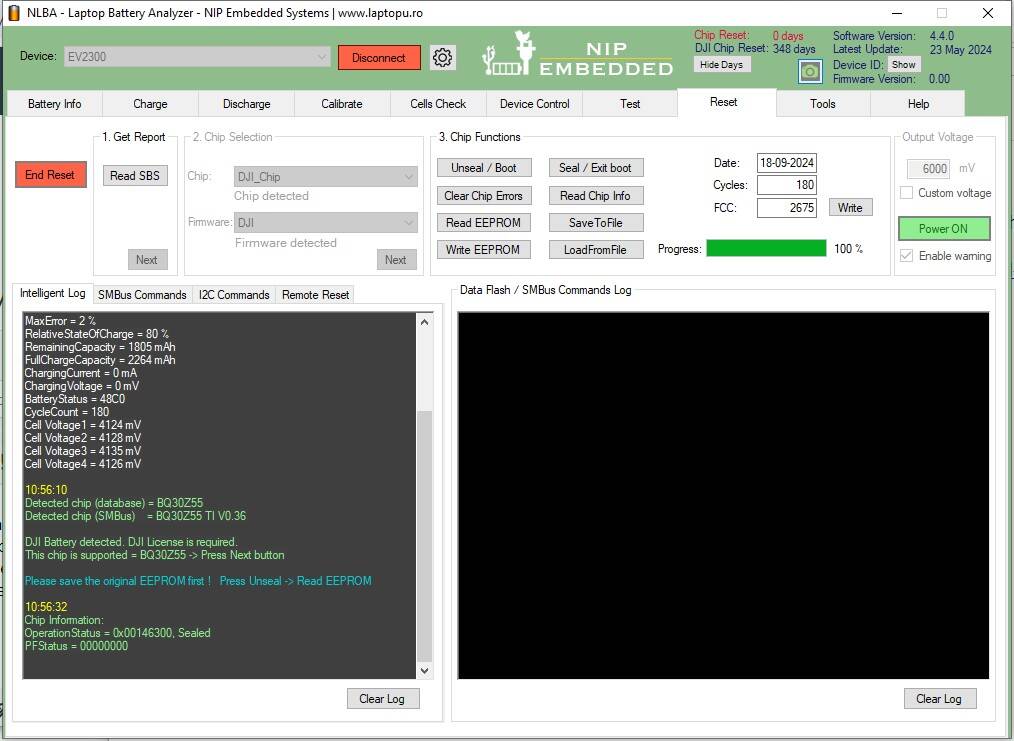
Just like your last request that is lacking detailed sequences, one must first successfully connect to battery, then press reset TAB (Yes we know difference)
We not provide such a detailed description for two reasons
- our product is intended for professionals only, and most of the steps are intuitive and no need to explain at all
- we did such detailed explanations in past for newbies, then we found noone read it, noone use forum Search option where similar topics already discussed, noone use detailed tutorials or product review. Instead newbies flood the forum with same stupid questions. Then we got they just want to make us bizy. Then we got our product should not be used by newbies at all. Its counterproductive to provide support for beginners. They stole all your business time. You should explain them every step and every button click via video conference and do this for each and other battery.
Screenshot attached of this exact sequence. Hope we have correctly understood your requests.
So battery is not locked because Permanent Failure Flag is all zero.
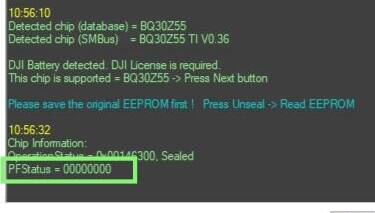
Disconnect battery from ev2300 and connect to DJI Charger to confirm it is Ok.
Thank you my friends at NBLA,
I have EE degree from University of Utah, with highest honors Summa Cum Laude. I began programming with 6502's back in 1988. I had one of the first APPLE ll's sold publicly. I am truly sorry and do not want to make more work for you. With respect to that goal, I was trying to follow intuitive paths in the software. That is was what I was trying to do when you chastised me for doing so - I am by far not a "newbee" and understand very well what you said in your last message; Simply to avoid spending any of your time unnecessarily. We have similar problems in our business as well, so we do understand.
Thank you again for your help and knowledge.
Mike P
Disconnect battery from ev2300 and connect to DJI Charger to confirm it is Ok.
Did you try this ?..
If battery is charging it means it is not Locked. You could also check it in the drone.
On BatInfo tab it is displayed "Locked" because battery is in switched Off condition, so MOSFETs are Off by battery MCU controller.
To change its state to "Unlocked" just switch On the battery by push-button short and long click.
Dear Moderators and Team Members,
I want to take a minute to explicitly Thank You and your team for your time, guidance and help. With your responses and inputs, I was able to successfully repair my first two P4 batteries. I don’t think I could have done it on my own without spending much more time.
I do apologize for taking so much of your time. I realize you are very busy.
After successfully learning how to Navigate and Operate the NLBA software, I find the functionality to be “Top Notch”. I also find it to be very well written. Thank you all!
Mike P
Thanks for feedback.
p.s. topic moved to Drone Batteries subforum because it was created in Laptop Battery category
It could be found on this link
https://www.laptopu.ro/community/reset-and-repair-dji-drone-battery/
Latest Post: Autel x-star battery Our newest member: [email protected] Recent Posts Unread Posts
